Primavera P6 and Excel for construction scheduling differ because Excel is designed for data management, while Primavera P6 is built specifically for construction scheduling.
Primavera P6 automatically manages task dependencies, calculates the critical path, and identifies delays. Excel requires manual updates, making it less effective for complex construction projects. This is why construction professionals switch from Excel to Primavera P6 for managing complex projects.
Key Takeaways
-
Excel needs manual formulas to link tasks. P6 links them automatically.
-
Excel can't level resources. P6 does it natively.
-
Excel has no audit trail. P6 time-stamps every change.
-
98% of construction projects run late or over budget, and outdated spreadsheet processes are repeatedly named as a cause.
-
Excel is free and easy to learn. P6 costs more but pays off on complex jobs.
Every construction scheduler has opened Excel at some point and built a plan in it. It's already on the laptop, everyone knows how to use it, and for a small job, it works fine.
This article breaks down exactly where the two tools differ, capability by capability, so you can see clearly which one actually fits your project.
Table of Contents
|
|
1. Primavera P6 vs Excel: Which Is Better for Construction Scheduling?
1.1 Task Dependencies
1.2 The Critical Path
1.3 Resource Levelling
1.4 Managing Multiple Projects
1.5 Baselines and Progress Tracking
1.6 Delay and Claims Documentation
1.7 Team Collaboration
1.8 Cost and Learning Curve
2. Why Are Professional Construction Teams Moving from Excel to Primavera P6?
3. FAQs: Primavera P6 vs Excel For Construction Scheduling: Why Professionals Switch
|
Primavera P6 vs Excel: Which Is Better for Construction Scheduling?
The comparison between Primavera P6 and Excel for construction scheduling is based on the following eight key factors:
-
Task Dependencies
-
The Critical Path
-
Resource Levelling
-
Managing Multiple Projects
-
Baselines and Progress Tracking
-
Delay and Claims Documentation
-
Team Collaboration
-
Cost and learning curve
1.1 Task Dependencies
Task dependencies is where the two tools split first. Microsoft Excel treats a dependency as something you build yourself. P6 treats it as something the system already understands.
Excel:
-
Dependencies run on formulas you write yourself.
-
One wrong cell, one deleted row, and the logic breaks silently.
-
Excel won't warn you when a link is gone; the schedule just keeps looking correct.
Primavera P6:
-
Dependencies are built into the software's structure.
-
Link two tasks once. P6 enforces the relationship for the whole project.
-
Change one date, and every connected task updates automatically, including float.
Data point: A 2026 review by TransitCosts using over 300 megaprojects above $1 billion found average schedule slippage of around 50% often traced back to logic errors that went unnoticed for weeks.
The clear difference: Excel depends on someone remembering to maintain the logic. P6 depends on nothing; it enforces the logic for you.
“The Abu Dhabi Government is committed to delivering infrastructure projects with the highest standards of efficiency, quality, and sustainability through robust project governance and execution."
- H.E. Maysarah Mahmoud Eid, Director General, Abu Dhabi Projects and Infrastructure Centre (ADPIC)
Not sure how to choose a corporate Primavera P6 training provider in Abu Dhabi? Explore TIME's corporate training programs and find the right fit for your team.
1.2 The Critical Path
The critical path tells you which tasks can't slip without delaying the whole project. One tool calculates it. The other doesn't have the feature at all.
Excel:
-
No critical path feature exists.
-
You'd need to calculate it by hand or trust an old formula.
-
Most Excel "schedules" are really just timelines, not true CPM logic.
Primavera P6:
-
The critical path recalculates automatically every time the schedule changes.
-
You always know which tasks have zero float and which have room to move.
-
Recalculation happens instantly, across the entire schedule.
Data point: Construction estimating and scheduling errors are estimated to cost US firms around $273 billion a year, contributing to as much as 52% of project delays.
The clear difference: Excel gives you a timeline. P6 gives you a true critical path, recalculated live.
Abu Dhabi Insight
As Abu Dhabi continues to invest in large-scale infrastructure, energy, and smart city projects, many contractors and project management teams are adopting Primavera P6 to meet the scheduling, reporting, and compliance requirements of complex developments.
Proficiency in Primavera P6 is increasingly valued by employers across the emirate's construction sector.
Wondering if Primavera P6 can help you start a career as a project coordinator in Abu Dhabi? Understand the Primavera P6 course and take the first step.
1.3 Resource Levelling
Resource levelling is the feature that most clearly separates a spreadsheet from real scheduling software because Excel doesn't have it at all.
Excel:
-
No resource levelling exists in any real form.
-
Two tasks needing the same crane or crew on the same day? Excel won't tell you.
-
Resource tracking has to be built manually, in a separate sheet.
Primavera P6:
-
Resource conflicts are detected automatically.
-
The software adjusts the schedule to resolve over-allocations within set constraints.
-
Levelling accounts for both cost and availability, not just dates.
Why resource levelling matters: This single feature is the most common reason multi-trade contractors switch to P6. It's not a "nice to have"; it's the one gap Excel structurally cannot close.
The clear difference: Excel can't see resource conflicts. P6 finds and fixes them before they cause delays.
Abu Dhabi Project Management Snapshot
Abu Dhabi's growing infrastructure pipeline is driving demand for advanced project scheduling skills. In 2026, the emirate launched an AED 55 billion public-private partnership (PPP) pipeline comprising 24 infrastructure projects, including 11 major road developments worth AED 35 billion.
(mediaoffice.abudhabi)
1.4 Managing Multiple Projects
Running one project is manageable in Excel. Managing multiple projects at once is where the spreadsheet approach breaks down.
Excel:
-
One file per project. No shared view across sites.
-
Comparing resources or deadlines across jobs means manually cross-checking spreadsheets.
-
Nothing flags a conflict between two separate projects.
Primavera P6:
-
A portfolio view shows every active project in one place.
-
Managers can spot resource clashes and risks across an entire pipeline at once.
-
Reporting rolls up across projects, not just within one.
Data point: More than 72% of large construction enterprises had integrated at least one centralised project management platform by 2025.
The clear difference: Excel shows one project at a time. P6 shows the whole portfolio at once.
How to choose between Primavera P6 and Excel for construction scheduling
| Choose If |
Use |
| Small, single trade, under 50 tasks |
Excel |
| Multiple trades depending on each other |
Primavera P6 |
| No contractual delay penalties |
Excel |
| Milestone payments or EOT clauses |
Primavera P6 |
| A one-off small job |
Excel |
| Several sites running at once |
Primavera P6 |
1.5 Baselines and Progress Tracking
Baselines and progress tracking are your original plan, locked in place so you can measure actual progress against it. Locking it properly is where Excel struggles.
Excel:
-
Baselines mean duplicating the file and comparing versions by hand.
-
Easy to lose track of which copy is the "real" original.
-
No automatic variance calculation; someone has to work it out manually.
Primavera P6:
-
Baselines are locked in and stored properly, inside the schedule itself.
-
Variance; ahead or behind, and by how many days, is calculated automatically.
-
Multiple baselines can be stored and compared side by side.
Data point: Projects using digital scheduling systems reported schedule adherence improving by 23%, alongside a 61% cut in document retrieval time.
The clear difference: Excel makes you reconstruct history. P6 keeps the history for you.
1.6 Delay and Claims Documentation
If a project ends up in a dispute, delay and claims documentation is the difference that decides whether your schedule holds up.
Excel:
-
No built-in change history.
-
Anyone can edit a date, with no record of the change.
-
Weak evidence in a formal delay claim.
Primavera P6:
-
Every update is time-stamped and stored.
-
This is why P6 underpins recognised delay analysis methods like Time Impact Analysis and Windows Analysis.
-
Produces a defensible, date-accurate record of what changed and when.
Data point: Research by openspace puts construction delays at close to universal: 98% of projects run late, with average duration extending 37% beyond the original plan.
The clear difference: In Excel, "we think it changed in March" is the best you can say. In P6, you have the exact date and the exact change.
Still wondering how long it takes to learn Primavera P6? Check TIME's Primavera P6 course duration and start planning your schedule today.
1.7 Team Collaboration
Scheduling rarely happens alone. Team collaboration is where version control either holds up or falls apart.
Excel:
-
Files get emailed around. Multiple versions circulate fast.
-
No single file anyone can point to as definitively current.
-
Easy for two people to edit different versions without knowing it.
Primavera P6:
-
One centralised schedule, with role-based permissions.
-
Scheduler, project manager, and client rep all see the same live data.
-
Changes are tracked against one source of truth.
Why team collaboration matters: Fewer copies means fewer arguments about which version is right and less time wasted reconciling them.
The clear difference: Excel creates copies. P6 creates one shared, trusted file.
For professionals in the UAE, structured Primavera P6 training is widely available through institutes in Dubai and Abu Dhabi, often combined with real project case studies rather than generic exercises, which shortens the gap between finishing a course and running a live schedule confidently.
1.8 Cost and Learning Curve
Cost and learning curve are the one area where Excel genuinely wins, and it deserves an honest answer, not a sales pitch.
Excel:
-
Free if you already have Office.
-
No formal training needed to get started.
-
Familiar to almost everyone on a project team.
Primavera P6:
-
Licence or subscription cost.
-
Takes a few weeks of training to reach working proficiency.
-
Deeper skills: resource levelling, delay analysis take longer through real project use.
Honest take: For a small, single-trade job, Excel is still the practical choice. The comparison tips toward P6 once complexity, resourcing, or contractual risk grows.
The clear difference: Excel wins on simplicity and cost. P6 wins on everything the job actually needs once it gets complex.
Trying to decide between classroom or online Primavera P6 training in Abu Dhabi? Compare TIME's training formats and choose what works best for you.
Excel vs Primavera P6: Total Cost of Ownership
| Factor |
Excel |
Primavera P6 |
| Upfront cost |
Free with Office/Google Workspace |
Licence or annual subscription
|
| Training investment |
Minimal |
Structured course (typically a few weeks)
|
| Ongoing error risk |
High on large schedules |
Low, logic-enforced |
| Rework from schedule errors |
Frequent |
Rare once set up correctly |
| Claims and dispute readiness |
Weak |
Strong, audit-ready |
| Long-term ROI on complex projects |
Poor |
High |
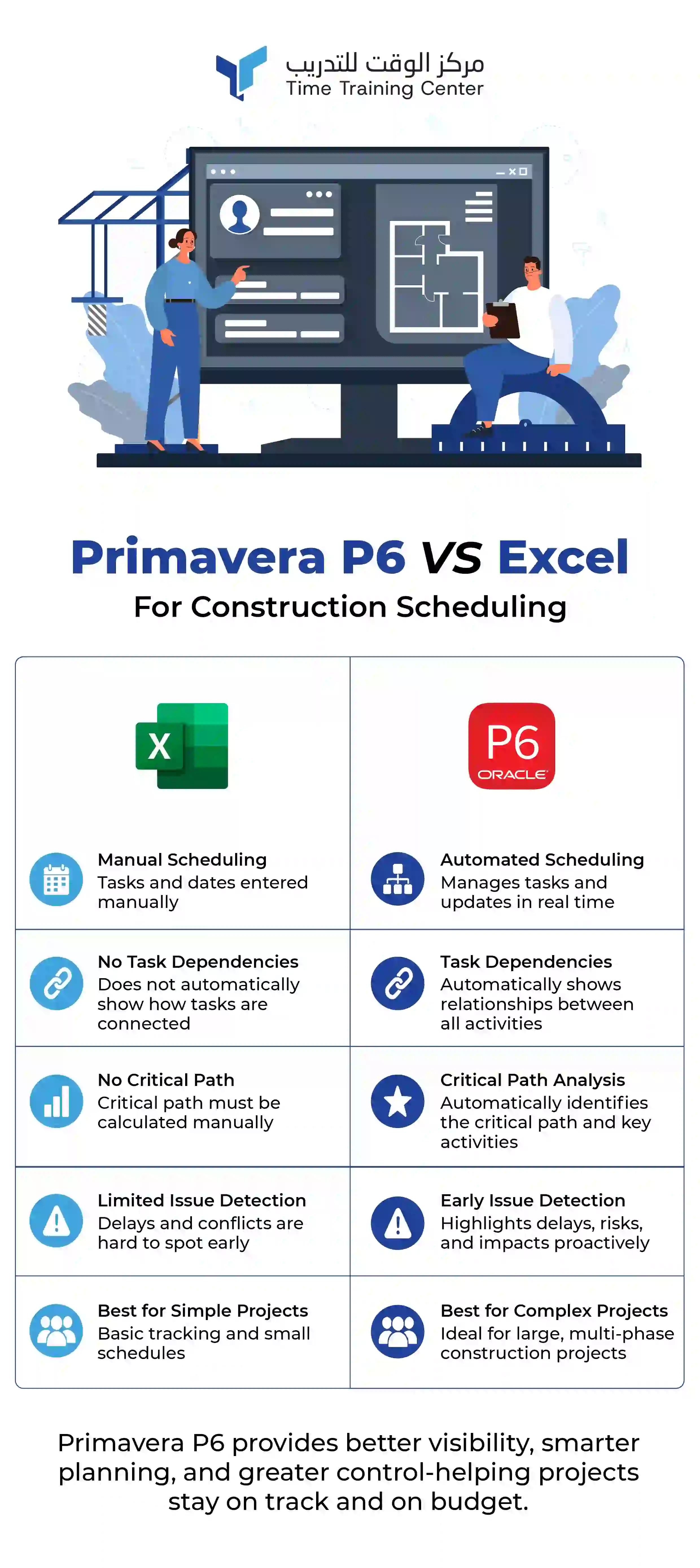
The comparison of Primavera P6 vs Excel at a glance is illustrated in the infographics below:
Why Are Professional Construction Teams Moving from Excel to Primavera P6?
Professional construction teams are moving from Excel to Primavera P6 for the following reasons:
-
Improved Schedule Control: Manage complex project timelines, dependencies, and critical paths with greater accuracy.
-
Real-Time Progress Tracking: Monitor project updates, delays, and milestones without manually updating multiple spreadsheets.
-
Better Team Collaboration: Enable multiple stakeholders to access, review, and update schedules from a centralised platform.
-
Reduced Project Risks: Identify scheduling conflicts early and use forecasting tools to minimise delays and cost overruns.
Now you know why Primavera P6 is essential for civil engineers in Abu Dhabi.
FAQ's:
1. When Should You Switch from Excel to Primavera P6?
You should consider switching to Primavera P6 when your projects involve multiple contractors, complex task dependencies, resource planning, or contractual milestones. It offers better control and visibility than spreadsheets for medium to large construction projects.
2. Why Do Construction Companies Prefer Primavera P6 Over Excel?
Construction companies prefer Primavera P6 because it automates scheduling, manages task dependencies, tracks the critical path, supports resource allocation, and generates professional reports capabilities that Excel requires manual effort to achieve.
3. Can Primavera P6 Improve Construction Project Planning?
Yes. Primavera P6 helps project teams create realistic schedules, identify potential delays early, optimise resource utilisation, and monitor project progress in real time, improving overall planning accuracy.
4. What Are the Biggest Limitations of Excel for Construction Scheduling?
Excel lacks built-in scheduling intelligence such as critical path analysis, dependency management, resource levelling, and baseline tracking. As projects grow in complexity, manual spreadsheet updates increase the risk of scheduling errors.
5. Is Primavera P6 Suitable for Beginners in Construction Project Management?
Yes. Primavera P6 is designed for both new and experienced project professionals. With structured training and hands-on practice, beginners can learn to create schedules, manage resources, and monitor project performance effectively.
6. Which Industries Commonly Use Primavera P6?
Primavera P6 is widely used across construction, infrastructure, oil and gas, utilities, engineering, manufacturing, transportation, and large government projects where detailed planning and project controls are essential.
 +971 2 6713828

1.jpeg)