Google Search Console Crawl Stats shows how Google crawls your website. It helps you understand Googlebot activity, server responses, and crawling patterns.
The report shows how often Google requests your URLs, how much data it downloads, and how quickly your server responds.
Googlebot visits URLs to discover new content and check existing pages. It can request HTML pages, images, JavaScript, CSS, and other files.
Crawl Stats helps you see this activity from Google's perspective.
Crawling is the first step before Google can consider a page for indexing. If Googlebot struggles to access your website, important content may take longer to discover or refresh.
The report can help you identify problems such as slow responses, server errors, excessive redirects, and crawling issues.
SEO students can use Crawl Stats to understand how Google interacts with websites. Learning technical areas like crawling can also strengthen the skills covered in SEO specialist training. SEO professionals use Crawl Stats to investigate technical crawling problems. Understanding these tasks also helps students see what an SEO specialist does in real-world SEO work..
How to Access the Crawl Stats Report
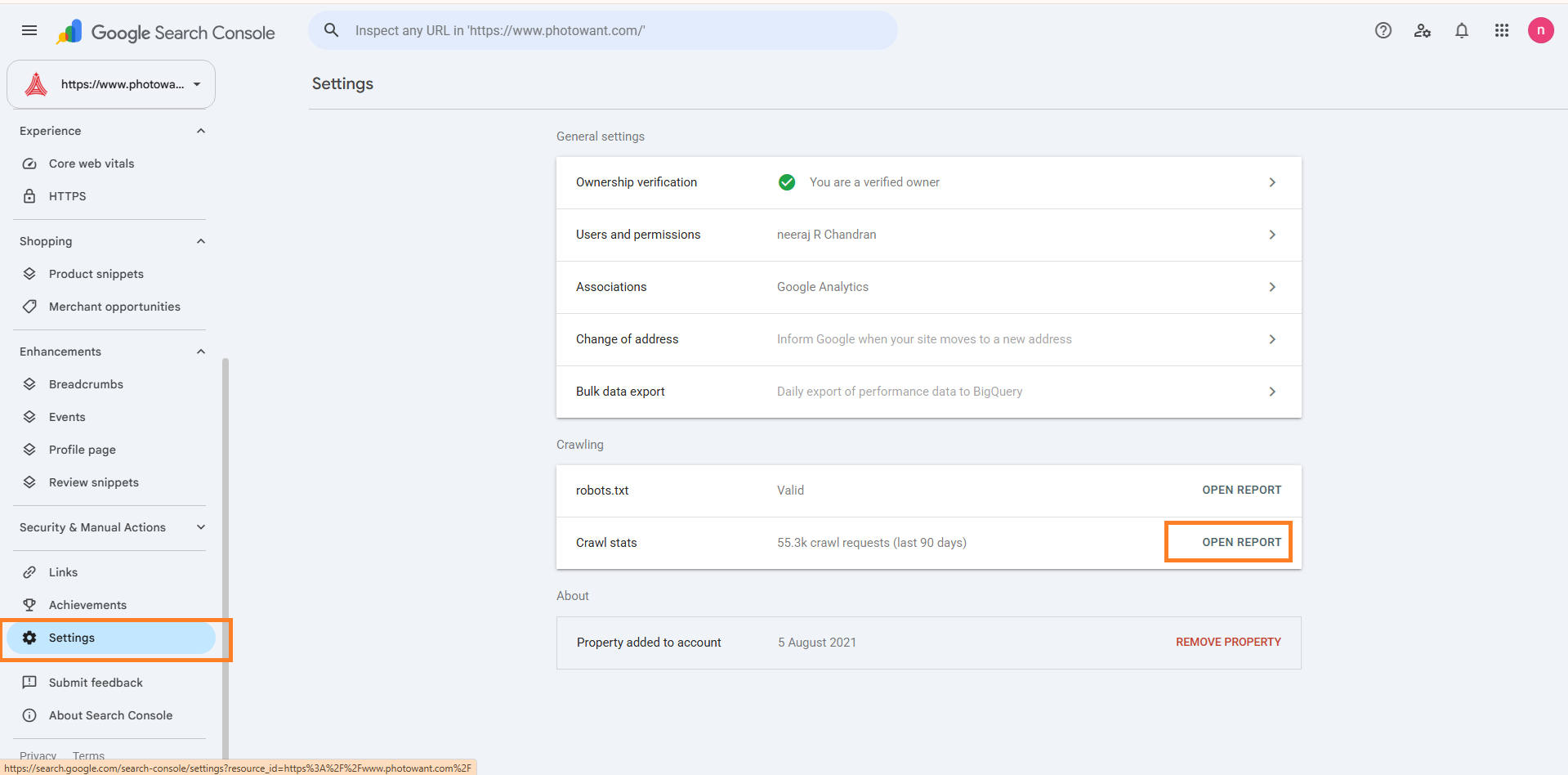
Go to Google Search Console → Settings → Crawl Stats.
You need a verified property in Google Search Console to access its Crawl Stats data. The report shows crawling activity for the selected website over the available reporting period.
Understanding the Crawl Stats Summary
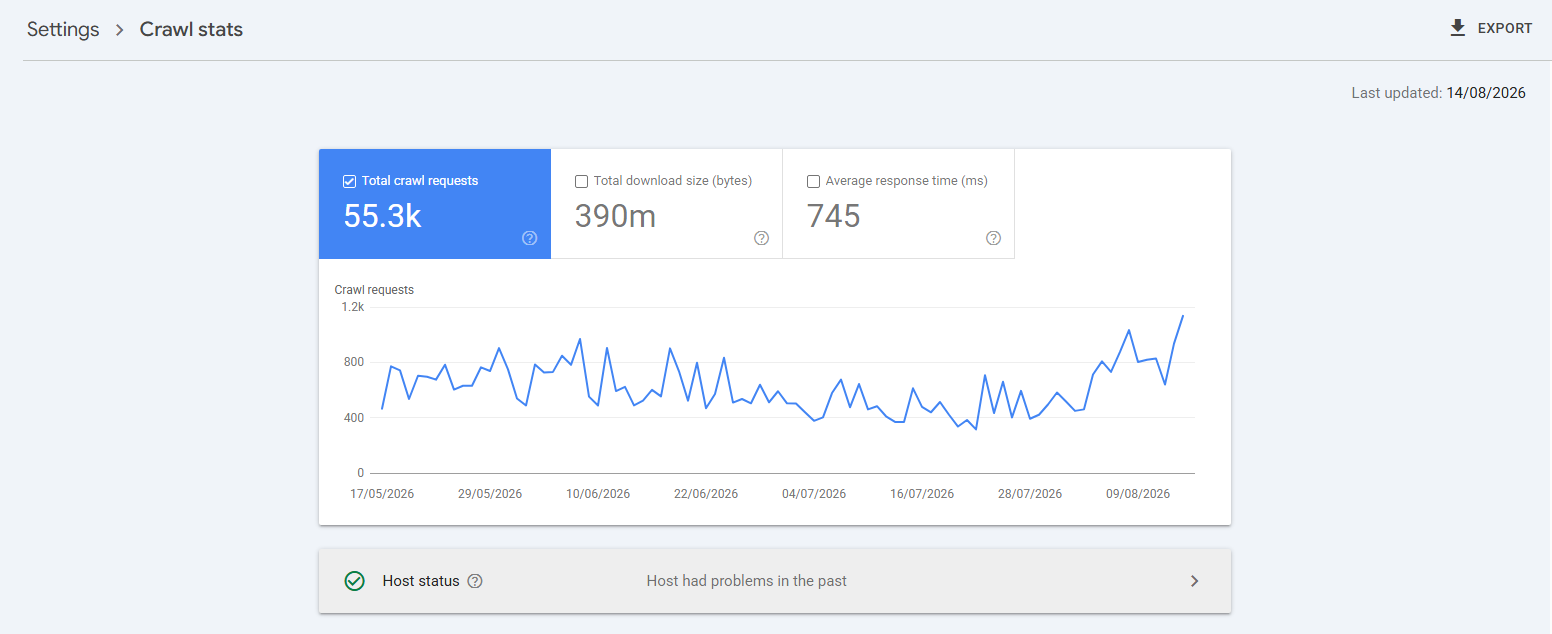
The summary section gives you three main measurements: total crawl requests, total download size, and average response time.
These metrics provide a quick view of how Googlebot interacted with your website during the selected period.
Total Crawl Requests
Total crawl requests show how many times Googlebot requested resources from your website.
A request can target an HTML page, image, CSS file, JavaScript file, or another resource. A high number does not automatically mean better SEO & GEO . You need to understand what Googlebot is requesting and why.
Total Download Size
Total download size shows how much data Google downloaded while crawling your website.
Large downloads can increase the resources Google needs to crawl your site. Look at this metric together with file types and crawl requests to understand what Googlebot is downloading.
Average Response Time
Average response time shows how long your server takes to respond to Googlebot's crawl requests.
A consistently high response time can indicate server performance or technical issues. Compare this metric with crawl activity and host status before deciding whether action is needed.
Understanding Host Status
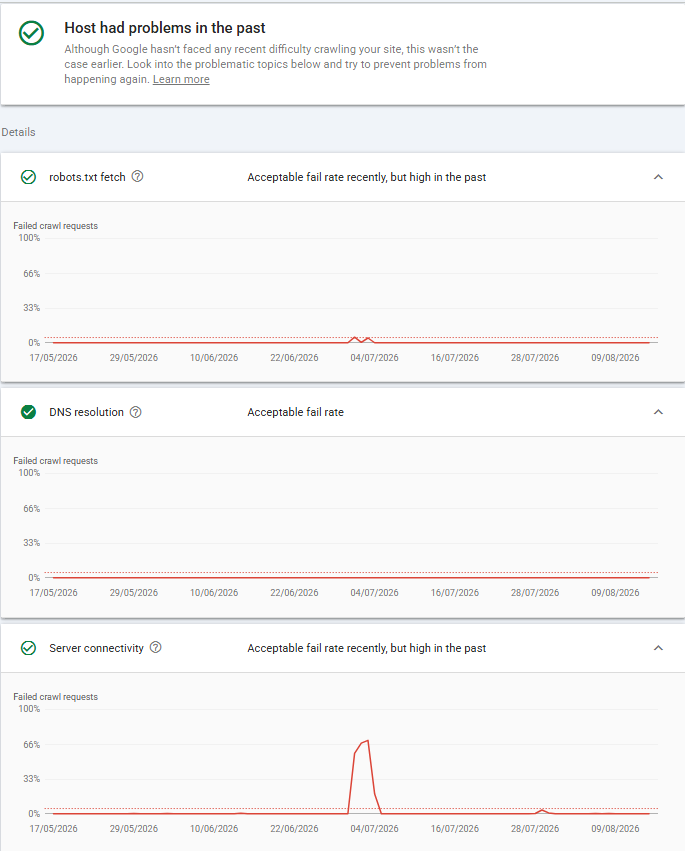
Host status shows whether Googlebot can successfully access the main technical services needed to crawl your website.
Google checks robots.txt, DNS resolution, and server connectivity. Problems in these areas can prevent or limit crawling.
Robots.txt Fetch
Googlebot checks your robots.txt file before crawling URLs. This file tells Google which parts of your website crawlers can access.
If Google cannot fetch robots.txt, crawling can be affected. Check for errors if the Crawl Stats report shows a problem here.
DNS Resolution
DNS resolution connects your domain name to its server.
If Google cannot resolve your domain correctly, Googlebot cannot reach your website. DNS problems can therefore interrupt crawling.
A failure rate below 5% can generally be treated as a low level of failure for practical monitoring.
Server Connectivity
Server connectivity shows whether Googlebot can connect to your web server.
Connection failures, timeouts, or server-side problems can prevent Googlebot from completing crawl requests. Check your hosting and server configuration when these issues appear repeatedly.
A failure rate below 5% can generally be treated as a low level of failure. If DNS failures consistently exceed 5%, check your DNS configuration, nameservers, and hosting setup.
Understanding Crawl Requests by Response
The crawl requests by response section shows how your server responds when Googlebot requests resources. These response codes help you identify successful crawls, redirects, missing URLs, and server errors.
A failure rate below 5% can generally be treated as a low level of failure. If failures consistently exceed 5%, investigate server availability, timeouts, firewall rules, and hosting problems.
200 OK
A 200 OK response means your server successfully delivered the requested resource.
Googlebot can access the resource and process its content. A high number of 200 responses is not automatically good or bad; you need to understand which resources Googlebot is requesting.
301 and 302 Redirects
A 301 response permanently redirects one URL to another. A 302 response indicates a temporary redirect.
Some redirects are normal, but excessive or unnecessary redirects can create additional crawl requests and make crawling less efficient.
304 Not Modified
A 304 Not Modified response tells Google that the requested resource has not changed since its previous visit.
Google can use its cached version instead of downloading the resource again. This can reduce unnecessary data transfers during crawling.
404 Not Found
A 404 Not Found response means the requested URL does not exist.
Some 404 responses are normal, especially when users or external websites link to old URLs. A large number of unexpected 404s may indicate broken internal links, removed content, or incorrect URLs.
5xx Server Errors
5xx responses indicate that your server encountered an error while handling Google's request.
Repeated 5xx errors can prevent Googlebot from accessing your content. If they occur frequently, investigate your hosting, server configuration, application, or database.
Understanding Crawl Requests by File Type
The By file type section shows the types of resources Googlebot requests from your website. The report can include HTML, JavaScript, CSS, images, XML, JSON, and other resource categories.
HTML
HTML files contain the main structure and content of web pages.
Googlebot requests HTML documents to discover and process page content. A high number of HTML requests can indicate frequent crawling of your website.
CSS
CSS files control the visual presentation of web pages.
Googlebot can request CSS resources while processing pages. These requests help Google understand how pages are presented and rendered.
JavaScript
JavaScript files provide interactive and dynamic functionality on websites.
Googlebot may request JavaScript resources when it needs to process and render pages. On large websites, especially JavaScript-heavy websites, a large number of JavaScript requests can consume part of the site's available crawling resources.
If Googlebot spends significant crawl activity on unnecessary JavaScript files, it can reduce the efficiency of crawling other resources. Keep JavaScript files necessary, accessible, and optimized.
Avoid loading unnecessary scripts across large numbers of pages. This can help Googlebot spend more of its crawl activity on important URLs and content.
Syndication
Syndication refers to resources used to distribute or provide content in a structured feed.
Examples can include RSS or Atom feeds. Websites that publish feeds may see Googlebot requests for these resources.
Image
Image requests include resources such as JPG, PNG, GIF, WebP, and other image formats.
Image-heavy websites may receive significant image crawling. Review this category when images represent a large share of your crawl activity.
Other XML
Other XML includes XML resources that do not fall into another specific category.
XML files can provide structured information to search engines or other systems. Examples may include XML feeds and other XML-based resources.
JSON
JSON files contain structured data that websites and applications can exchange.
Googlebot may request JSON resources when a website uses APIs, dynamic content, or other JavaScript-driven functionality.
Other File Type
Other file type includes resources that do not fit into the main file-type categories shown by Search Console.
The exact resources can vary between websites. Check this category when it represents a significant share of your crawl requests.
Unknown (Failed Requests)
Unknown (failed requests) represents crawl requests where Google could not successfully determine or retrieve the expected file type.
A high percentage can deserve investigation. Check the response status, server connectivity, and affected URLs to understand why these requests failed.
Understanding Crawl Requests by Purpose
The By purpose section shows why Googlebot is crawling your website. Search Console groups crawl requests into two main purposes: Discovery and Refresh.
Discovery
Discovery crawling happens when Googlebot finds URLs that it has not crawled before.
Google may discover new URLs through internal links, external links, sitemaps, or other sources. Discovery crawling helps Google find new pages and resources on your website.
When you regularly publish useful content, Google has more new URLs to discover. If those pages are well-linked and included in your sitemap, Google can find them more easily.
Discovery does not guarantee indexing, rankings, or impressions. However, discovering more valuable pages allows those pages to enter Google's indexing and ranking systems.
Refresh
Refresh crawling happens when Googlebot revisits URLs it already knows about.
Google may recrawl a page to check whether its content has changed. A high percentage of refresh requests can be normal for websites with frequently updated content.
Why Maintain a Consistent Publishing Frequency?
A fixed publishing schedule does not directly make Google rank your website higher.
Instead, consistent publishing creates a predictable content system. Regularly publishing useful content gives Google more valuable URLs to discover, crawl, index, and potentially rank.
The goal is not to publish simply to increase crawl requests. The goal is to build a useful, well-connected content inventory that search engines and users can discover.
Understanding Crawl Requests by Googlebot Type
The By Googlebot type section shows which Google crawler or user agent generated the crawl requests. Different Google crawlers serve different purposes, so this report helps you understand what Google is requesting from your website.
Smartphone Googlebot
Smartphone Googlebot crawls websites using a mobile browser configuration.
Google primarily uses the mobile version of Googlebot for crawling and indexing websites. Make sure important content, links, structured data, and resources are available on the mobile version of your pages.
Desktop Googlebot
Desktop Googlebot crawls websites using a desktop browser configuration.
Desktop crawling can still appear in Crawl Stats, although mobile-first indexing means Google generally uses the mobile version of content for indexing.
Image Googlebot
Image Googlebot crawls images and image-related resources.
Its activity can be important for websites that depend heavily on image search, such as photography, ecommerce, publishing, and visual-content websites.
Page Resource Load
Page resource load represents requests for resources needed to load or render a page.
These resources can include files such as JavaScript, CSS, images, and other page dependencies. Reviewing this activity can help identify resource-heavy pages or unexpected crawl patterns.
Other Agent Type
Other agent type covers Google crawling activity that does not fit into the main Googlebot categories shown in the report.
The exact agents included can vary depending on Google's crawling systems and the resources on your website.
Special-Purpose Googlebots
Google also operates specialized crawlers for specific products and services.
These can include crawlers associated with advertising, images, and other Google services. Their activity can appear separately in Crawl Stats depending on your website and Google's requests.
How to Analyze Crawl Stats Data
Crawl Stats becomes useful when you compare its metrics instead of looking at one number alone. Look for changes, unusual patterns, and relationships between crawl activity and your website's technical performance.
Compare crawl requests over time to identify unusual increases or decreases in Googlebot activity.
-
A steady increase in crawl requests can indicate that Google is discovering and revisiting new, useful content at a healthy pace. This often happens when a website consistently publishes quality content and maintains a clear internal linking structure.
-
A large spike in a short period deserves investigation. It can occur after publishing many URLs, making major site changes, adding large numbers of resources, or exposing Googlebot to automatically generated or injected URLs. In some cases, unexpected URL generation or a content injection attack can create an unusually large crawl demand.
-
A gradual decline in crawl requests may indicate that the website is publishing less content, producing fewer valuable URLs, or giving Google fewer reasons to revisit existing pages. It can also occur when content quality declines or important internal links are removed.
-
A sudden and sustained drop requires technical investigation. Check for robots.txt restrictions, server errors, DNS or hosting problems, crawl accessibility issues, accidental noindex directives, major URL changes, or Or critical issue like manual action that may prevent Google from crawling the site normally.
Compare Crawl Requests With Response Time
Look at total crawl requests together with average response time.
If crawl activity increases while response time also rises significantly, your server may be struggling to handle Google's requests. This becomes more important for large websites with many URLs.
Check Where Googlebot Spends Its Crawl Activity
Use file type, response, and Googlebot type data to understand where Googlebot spends its crawl activity.
For example, if a large share of requests goes to images, JavaScript, or other resources, investigate whether those requests are necessary and expected.
Compare Discovery and Refresh Crawls
Compare Discovery and Refresh requests to understand Google's crawling behavior.
More Discovery activity can occur when Google finds many new URLs. More Refresh activity can occur when Google revisits known URLs to check for changes.
Neither percentage is automatically better. The right balance depends on how often your website publishes or updates content.
Check for Recurring Host Problems
Review robots.txt, DNS resolution, and server connectivity for recurring failures.
One temporary error may not indicate a serious problem. Repeated host issues can prevent Googlebot from accessing your website reliably and deserve technical investigation.
 +971 2 6713828