Crawl Stats can help you identify technical problems that affect how Googlebot accesses your website. Use the report to find patterns, then investigate the affected URLs and server behavior.
Identify Server and Connectivity Problems
Check Host status for problems with robots.txt, DNS resolution, or server connectivity.
Repeated failures can prevent Googlebot from accessing your website. Check your hosting, DNS settings, firewall, and server logs when these problems occur.
Understanding how to diagnose these technical issues is one of the SEO skills expected from an SEO professional.
Find Excessive 404 and 5xx Responses
Review the By response section for large numbers of 404 and 5xx responses.
A 404 may be expected when a page has been permanently removed. However, unexpected 404s can indicate broken links or incorrect URLs.
Repeated 5xx responses are more concerning because they indicate server-side failures that can prevent Googlebot from successfully crawling resources.
Identify Unnecessary Redirects
Check how many crawl requests receive 301 or 302 responses.
Redirects are useful when URLs genuinely change, but unnecessary redirect chains can create additional crawl requests. Where possible, link directly to the final URL.
Find Crawl Waste
Look for Googlebot activity that does not contribute much value to your website.
Examples can include unnecessary URL variations, duplicate resources, outdated URLs, or large numbers of requests for files that do not need frequent crawling.
The goal is not to reduce crawling at any cost. The goal is to help Google spend its crawl activity on useful and accessible resources.
Check Whether Important Content Is Being Crawled
Crawl Stats can show that Googlebot is active without telling you whether it is crawling your most important pages.
Use Crawl Stats together with URL Inspection, sitemaps, internal links, and the indexing reports to check whether important content is discoverable and accessible.
A page being crawled does not guarantee that Google will index or rank it.
For students building their foundation in SEO, understanding the difference between crawling, indexing, and ranking is an important part of learning what an SEO specialist does.
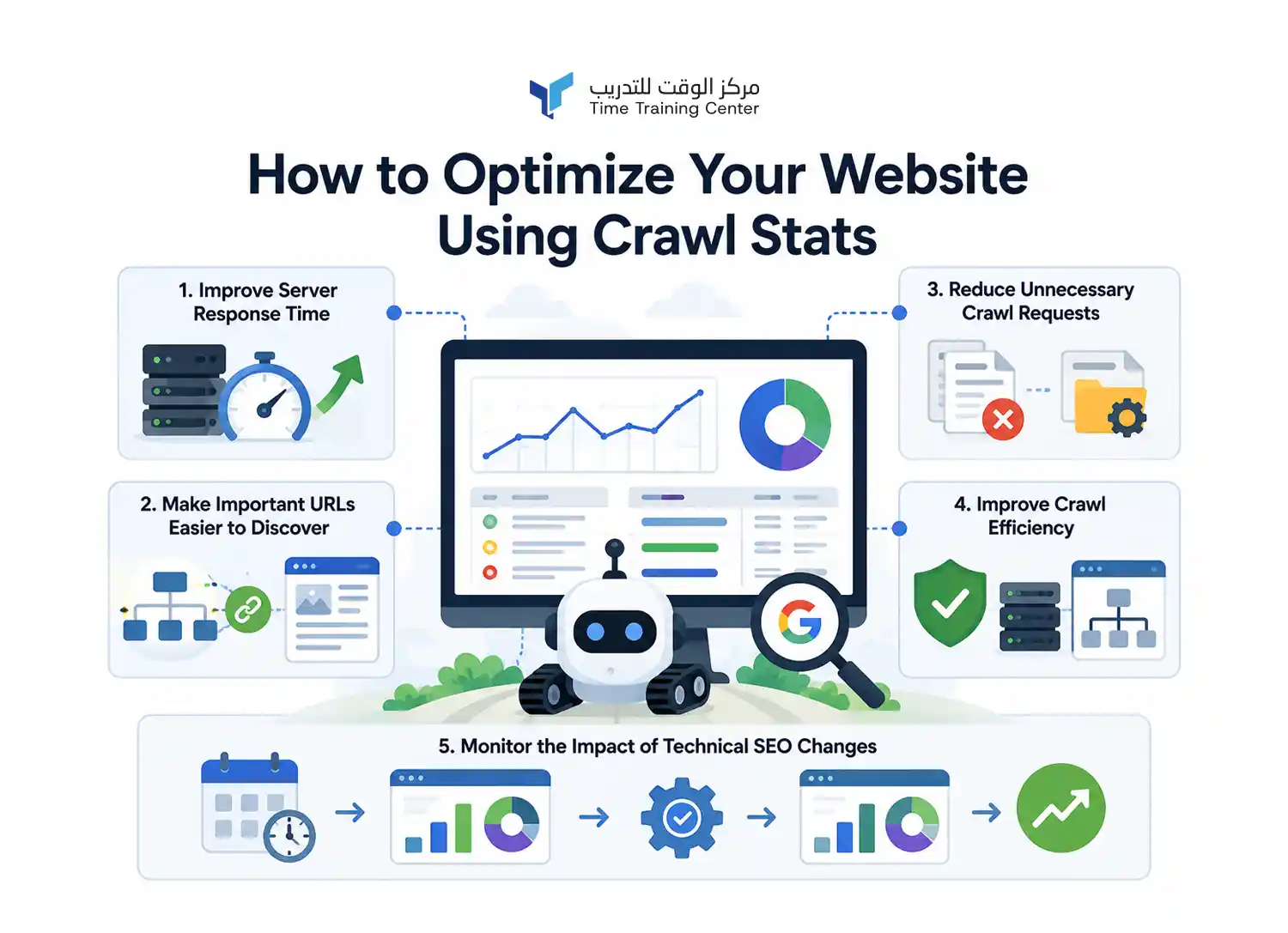
Your Website Using Crawl Stats
Crawl Stats can help you find areas where your website's crawling can become more efficient. Use the data to improve accessibility, reduce unnecessary requests, and help Googlebot reach valuable resources.
Improve Server Response Time
Monitor average response time in the Crawl Stats summary.
A consistently slow server can make crawling less efficient. Improve hosting performance, server configuration, caching, database queries, and other technical factors that affect response time.
Make Important URLs Easier to Discover
Help Google find important pages through internal links and XML sitemaps.
A clear site structure gives Googlebot useful paths to discover new and updated content. Keep important pages connected to relevant category and topic pages.
This becomes especially important when you regularly publish content marketing assets. New content needs clear internal connections so both users and search engines can discover it.
Reduce Unnecessary Crawl Requests
Look for resources and URLs that receive frequent crawling without providing significant value.
Examples may include duplicate URL variations, outdated URLs, unnecessary redirects, and other crawlable resources that do not need frequent requests.
Improve Crawl Efficiency
Crawl efficiency means helping Googlebot spend its crawl activity on useful resources.
Keep important pages accessible, fix recurring server errors, remove unnecessary redirects, and avoid creating large numbers of duplicate or low-value URLs.
Monitor the Impact of Technical SEO Changes
Use Crawl Stats before and after major technical changes.
For example, if you improve server performance, remove unnecessary redirects, or change your URL structure, compare crawl requests and response times afterward. This helps you understand whether the change improved crawling behavior.
Crawl Stats and Crawl Budget
Crawl budget refers to the amount of crawling Googlebot can perform on a website within a given period. It becomes more important as websites grow larger and contain many URLs.
What Crawl Budget Means
Crawl budget is influenced by two main factors: crawl capacity limit and crawl demand.
Crawl capacity depends on how much crawling your server can handle. Crawl demand depends on how much Google wants to crawl your URLs based on factors such as their importance, freshness, and changes.
When Crawl Budget Matters
Crawl budget is usually not a major concern for small websites with a limited number of pages.
It becomes more relevant for large websites, especially sites with thousands or millions of URLs, frequently changing content, or many URL variations.
How Crawl Stats Help Large Websites
Crawl Stats helps large websites understand how Googlebot uses its available crawling activity.
You can review response times, crawl requests, response codes, file types, and crawl purposes to identify areas where crawling may be inefficient.
The goal is not to make Google crawl your website as much as possible. The goal is to help Googlebot efficiently access the URLs that matter most.
Common Crawl Stats Mistakes Students Should Avoid
Crawl Stats can be easy to misinterpret when you are learning technical SEO. Avoid these common mistakes when analyzing the report.
Assuming More Crawls Mean Better SEO
More crawl requests do not automatically mean better rankings or more traffic.
Google may crawl a website frequently without indexing its pages or showing them in search results. Focus on whether Google can efficiently access your important content.
Treating Every Crawl Error as a Critical Problem
Not every error requires immediate action.
A few 404 responses can be normal, especially when old URLs no longer exist. Look for repeated or unexpected patterns before deciding that a problem is serious.
Confusing Crawling With Indexing
Crawling and indexing are different processes.
Crawling means Googlebot accessed a URL. Indexing means Google processed and stored information about that URL for possible display in Search.
A crawled page is not guaranteed to be indexed.
Using Crawl Stats to Measure Organic Traffic
Crawl Stats measures Googlebot activity, not website visitors or search traffic.
Use Performance in Google Search Console to analyze impressions, clicks, and search queries. Use Crawl Stats to understand how Google crawls your website.
A Simple Crawl Stats Analysis Workflow
Use a consistent process when analyzing Crawl Stats. This helps you move from raw crawl data to a clear technical SEO action.
Check the Summary Metrics
Start with crawl requests, total download size, and average response time.
Look for major changes or unusual patterns compared with the previous period.
Check Host Status
Review robots.txt, DNS resolution, and server connectivity.
Make sure Googlebot can consistently access your website without recurring technical failures.
Review Crawl Responses
Check the response codes Googlebot receives.
Pay particular attention to unexpected 404 responses, repeated 5xx errors, and large numbers of redirects.
Review Crawl Purpose and File Types
Check whether Googlebot is mainly discovering new URLs or refreshing existing ones.
Then review the file types receiving the most crawl requests. This can reveal where Googlebot spends most of its crawl activity.
Identify Issues and Take Action
Connect the findings before making changes.
For example, if response time is high and server connectivity shows problems, investigate server performance first. If Googlebot repeatedly requests unnecessary URLs, review your internal links, URL structure, and crawl controls.
After making changes, check Crawl Stats again to see whether the crawling pattern improves.
Key Takeaways From Google Search Console Crawl Stats
Crawl Stats helps you understand how Googlebot interacts with your website. The report is most useful when you connect its different sections instead of focusing on a single metric.
What to Check First
Start with crawl requests, response time, download size, and host status.
Then review response codes, file types, crawl purpose, and Googlebot types to understand the crawling pattern.
Which Metrics Matter Most
There is no single metric that determines whether your website is healthy.
Look for meaningful changes, recurring errors, slow responses, unnecessary crawl requests, and unusual crawling patterns.
When to Take Action
Take action when Crawl Stats reveals a consistent technical problem or an inefficient crawling pattern.
Remember that crawling does not guarantee indexing, rankings, or impressions. Use Crawl Stats with indexing, URL Inspection, Performance, and other Search Console reports to understand your website's overall search performance.
 +971 2 6713828